How to Parse and Analyze URL Components — Practical Developer Guide
URLs have six distinct components. Learn protocol, domain, port, path, query parameters, and fragments — with a free online URL parser tool.
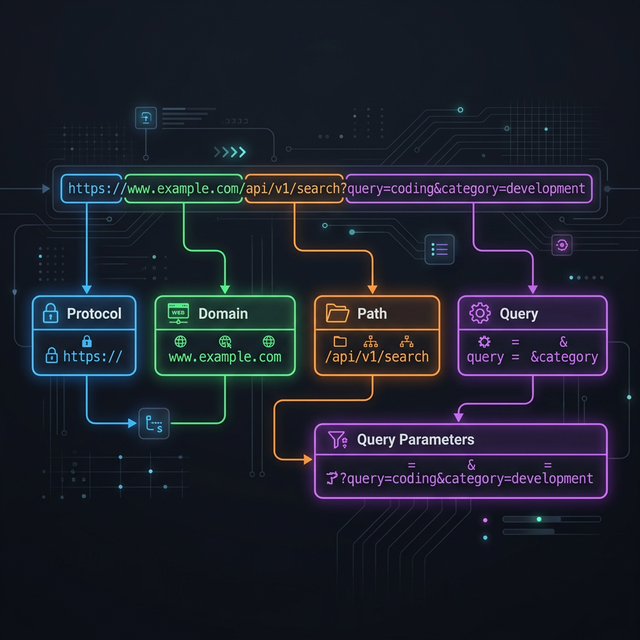
Every URL you type into a browser, click in an email, or share in a message is a structured address composed of distinct components, each serving a specific purpose in web communication. Understanding URL anatomy is fundamental knowledge for web developers, SEO specialists, security researchers, and anyone who works with web technologies professionally. A URL is not just a string of characters — it is a standardized communication protocol that tells browsers precisely where to go, how to connect, what to request, and where to scroll on the resulting page. This guide breaks down every component of a URL with practical examples, explains URL encoding for special characters, and shows you how to use Akhbarq's URL parser tool to instantly decompose any URL into its constituent parts for analysis, debugging, and understanding. Whether you are debugging API endpoints, analyzing tracking parameters, constructing dynamic links, or simply trying to understand what a complex URL actually does, this knowledge is directly applicable to your daily work.
The Six Anatomy Parts of Every URL
The official URL specification (RFC 3986) defines a URL as a sequence of components arranged in a specific order. While not every URL contains all six components, understanding each one provides complete literacy for reading and constructing any URL you encounter.
Protocol: https Host: api.example.com Port: 8080 Path: /users/profile Query: id=42&lang=en Fragment: bio
Each component is separated by specific delimiter characters: :// separates
the protocol from the host, : separates the host from the port, / begins the path,
? begins the query string, and # begins the fragment. These delimiters are
standardized and unambiguous, allowing any URL parser — from browser address bars to programming
language libraries — to reliably decompose any URL into its components.
Protocol (Scheme) — HTTP vs HTTPS and Beyond
The protocol (also called the scheme) specifies how the browser should communicate with
the server. The two most common protocols are http:// (HyperText Transfer Protocol) and
https:// (HTTP Secure). The difference is encryption: HTTPS encrypts data in transit between
your browser and the server using TLS (Transport Layer Security), preventing eavesdropping, tampering, and
impersonation. In 2026, HTTPS is the expected standard — major browsers display security warnings for
HTTP sites, and Google uses HTTPS as a ranking signal for search results.
Beyond HTTP and HTTPS, URLs support numerous other protocols for different communication
purposes. ftp:// accesses FTP file servers. mailto: opens email composition.
tel: initiates phone calls on mobile devices. file:// accesses local filesystem
resources. ssh:// initiates secure shell connections. Each protocol tells the client
application
(browser, email client, or operating system) which communication method to use for the resource request,
ensuring the right tool handles the right type of connection.
Developers working with APIs frequently encounter custom URL schemes in mobile
development. iOS apps register custom schemes (like myapp://) to enable deep linking —
URLs that open a specific screen within a native application rather than a web page. Understanding that
these custom schemes follow the same URI specification as standard web URLs helps developers construct and
debug deep links correctly.
Host and Domain — Subdomain, TLD, and IP Addresses
The host component identifies the server that holds the requested resource. In most URLs
you encounter, the host is a domain name like example.com or api.example.com. The
domain name system (DNS) translates these human-readable names into IP addresses that browsers use to locate
the server on the internet.
Domain names have a hierarchical structure read from right to left. In
api.example.com, "com" is the top-level domain (TLD), "example" is the second-level domain (the
registered domain name), and "api" is a subdomain. Subdomains are created by the domain owner to organize
services — "api" for API endpoints, "www" for the main website, "blog" for content, "mail" for email
services. Each subdomain can point to a different server or service while sharing the parent domain's
identity and trust.
URLs can also use IP addresses directly instead of domain names:
http://192.168.1.1 or http://[2001:db8::1] (IPv6 addresses require square
brackets). IP-based URLs are common in local development environments, network administration interfaces,
and IoT device management panels. However, production web services almost universally use domain names
because they are human-readable, memorable, and can be changed to point to different servers without
requiring URL updates.
Port, Path, and Directory Structure
Port. The port number identifies which service on the server should
handle the request. Web servers typically listen on port 80 (HTTP) and port 443 (HTTPS). When these default
ports are used, the port is omitted from the URL — browsers add it automatically. Non-standard ports
must be specified explicitly: http://localhost:3000 (development server),
https://api.example.com:8443 (custom API port). Ports range from 0 to 65535, with ports below
1024 reserved for well-known services (80 for HTTP, 443 for HTTPS, 22 for SSH, 21 for FTP).
Path. The path identifies the specific resource on the server, similar
to a file path on your computer. In /users/profile, "users" and "profile" are path segments
separated by forward slashes. Historically, paths mapped directly to file system directories —
/images/photo.jpg referred to a literal file at that location. Modern web applications use
routing systems that map paths to handler functions rather than physical files, making paths semantic
identifiers rather than literal file locations.
Path structure has direct SEO implications. Google reads URL paths as content signals.
The URL /recipes/chocolate-chip-cookies provides more topical context than
/p/12847.
Descriptive, hierarchical paths improve search engine understanding of your content hierarchy and can appear
in search results as breadcrumbs, improving click-through rates. Keep paths concise, descriptive, and
hyphen-separated for maximum SEO benefit and human readability.
Query Parameters — How They Pass Data to Servers
Query parameters follow the ? character and consist of key-value pairs
separated by & characters. In ?id=42&lang=en, there are two parameters:
"id" with value "42" and "lang" with value "en". These parameters pass data to the server without changing
the resource path — the server uses them to filter, sort, configure, or customize the response.
Common query parameter use cases include search queries (?q=URL+parsing),
pagination (?page=3&limit=20), filtering
(?category=electronics&price_max=500),
sorting (?sort=price&order=asc), and language selection (?lang=fr). API
endpoints use query parameters extensively to accept request configuration without requiring separate
endpoints for each variation. Understanding query parameters is essential for debugging API calls, analyzing
tracking URLs, and constructing dynamic links.
💡 Key Insight
UTM parameters (utm_source, utm_medium, utm_campaign, utm_content, utm_term) are standardized query parameters used for marketing analytics tracking. When you see these parameters in a URL, they tell analytics tools (Google Analytics, Adobe Analytics) where the visitor came from and which campaign brought them. Understanding UTM parameters helps you analyze marketing effectiveness and debug tracking issues in campaign URLs.
Query parameter order does not affect functionality —
?id=42&lang=en and ?lang=en&id=42 produce identical results. However, some
caching systems and CDNs may treat different parameter orders as different URLs, potentially creating
duplicate cache entries. For consistent caching behavior, sort query parameters alphabetically in your
application's URL generation logic. This practice also simplifies URL comparison for deduplication and
analytics processing.
Fragment Identifiers — What Comes After the Hash
The fragment identifier follows the # character and identifies a specific
section within the loaded page. In #bio, the browser scrolls to the element with
id="bio" after loading the page. Unlike all other URL components, the fragment is never sent to
the server — it is processed entirely by the browser after the page loads. This makes fragments useful
for page-internal navigation without generating additional server requests.
Single-page applications (SPAs) use fragments for client-side routing:
https://app.example.com/#/dashboard loads the main application shell from the server, then the
JavaScript router reads the fragment (/dashboard) and renders the appropriate view. This
"hashbang" routing approach was common before the History API enabled cleaner URL-based SPA routing. Some
older SPAs and embedded widgets still use fragment-based routing because it requires no server-side
configuration for URL handling.
From an analytics perspective, fragments present a unique challenge. Because fragments
are not sent to the server, server-side analytics (web server logs) cannot distinguish between page visits
with different fragments. Client-side analytics (Google Analytics JavaScript) can track fragment changes
through the hashchange event, but this requires explicit configuration. If your site uses
fragments for navigation, ensure your analytics implementation captures fragment-based page views to avoid
blind spots in your traffic data.
URL Encoding — Special Characters and Percent-Encoding
URLs can only contain a limited set of characters defined by the URI specification:
letters (A-Z, a-z), digits (0-9), and a handful of special characters (-._~). Any other
character — spaces, accented letters, CJK characters, punctuation marks — must be
percent-encoded before inclusion in a URL. Percent-encoding replaces each byte of the character's UTF-8
representation with % followed by two hexadecimal digits.
Common encoding examples: a space becomes %20 (or + in query
strings), an ampersand becomes %26, a forward slash becomes %2F, and a question
mark becomes %3F. When these characters appear as data within a URL component (rather than as
delimiters), encoding is required to prevent the parser from misinterpreting data characters as structural
delimiters. Forgetting to encode a literal & in a query parameter value, for example,
creates an unintended parameter boundary that breaks the intended data structure.
Most programming languages provide built-in URL encoding functions:
encodeURIComponent() in JavaScript, urllib.parse.quote() in Python,
URLEncoder.encode() in Java. Always use these library functions rather than implementing
encoding manually — manual encoding frequently misses edge cases (multi-byte characters, reserved
characters that should be encoded in some contexts but not others) that library implementations handle
correctly based on the RFC specification.
How to Use Akhbarq URL Parser Tool
Akhbarq's URL Parser instantly decomposes any URL into its constituent components, displaying each part with clear labels and color coding. This is invaluable for debugging complex URLs, understanding unfamiliar API endpoints, and verifying that URLs are constructed correctly before use in production code or marketing campaigns.
Step 1: Paste any URL into the parser input field. The tool accepts HTTP/HTTPS URLs, FTP URLs, and any URI-formatted string.
Step 2: The parser instantly displays each component: protocol, host (with subdomain and TLD identified separately), port (if specified), path (with individual segments listed), query parameters (each key-value pair on its own line), and fragment identifier.
Step 3: For URLs with query parameters, the tool automatically decodes percent-encoded values so you can read parameter data in human-readable format. This is especially useful for analyzing marketing URLs with encoded UTM parameters, redirect URLs with encoded destination addresses, and API endpoints with complex parameter structures that are difficult to read in their raw encoded form.
✅ Pro Tip
Clean, descriptive URL structure is an SEO ranking factor. URLs like
/products/wireless-headphones rank better than /p?id=47382 because search
engines extract keyword signals from URL paths. When designing URL structures for your website, use
descriptive, hyphen-separated paths that communicate content topic clearly to both search engines and
human readers. Treat your URL structure as part of your on-page SEO strategy.
URL Security Considerations Developers Must Know
Understanding URL components is essential for web security. Several common attack
vectors exploit URL structure to deceive users or inject malicious content. Open redirect vulnerabilities
occur when applications redirect users to URLs specified in query parameters without validating that the
destination URL is trusted. An attacker crafts a URL like
https://trusted-site.com/redirect?url=https://evil-site.com, using the trusted domain's
reputation to lure victims to a malicious destination. Always validate redirect URLs against a whitelist
of allowed domains to prevent open redirect attacks.
Homograph attacks exploit internationalized domain names (IDNs) that use characters from non-Latin scripts visually identical to Latin characters. The Cyrillic character "а" looks identical to the Latin "a" but is a different Unicode code point, allowing attackers to register domains that appear identical to legitimate sites in the browser address bar. Modern browsers mitigate this by displaying Punycode (xn--) representations for mixed-script domains, but users should remain aware that domain names can be visually deceptive despite appearing correct at first glance.
Path traversal attacks exploit URL paths containing directory navigation sequences
(../) to access files outside the intended directory scope. A URL like
/download?file=../../etc/passwd attempts to navigate up the directory tree and access
sensitive system files. Server-side path validation must sanitize path components by removing directory
traversal sequences and validating that resolved paths remain within the expected directory boundaries.
Understanding how path components resolve to filesystem locations is fundamental to preventing these
attacks in your applications.
Frequently Asked Questions
Q: What is the maximum length of a URL?
A: While the URL specification does not define a maximum length, practical limits exist. Most browsers support URLs up to 2,083 characters (Internet Explorer's historical limit). Modern browsers handle longer URLs, but web servers, proxies, and CDNs may truncate or reject URLs exceeding 2,000-8,000 characters. For reliable cross-platform compatibility, keep URLs under 2,000 characters.
Q: Are URLs case-sensitive?
A: It depends on the component. The protocol and host are case-insensitive
(HTTPS://EXAMPLE.COM equals https://example.com). The path, query
parameters, and fragment are case-sensitive on most servers —
/Users/Profile and /users/profile may resolve to different resources.
Convention favors lowercase URLs for consistency and SEO purposes.
Q: What is the difference between a URL and a URI?
A: A URI (Uniform Resource Identifier) is the broader category. A URL (Uniform Resource Locator) is a type of URI that specifies how to locate a resource (includes the protocol). A URN (Uniform Resource Name) is a URI that names a resource without specifying its location. In everyday web development, the terms URL and URI are used interchangeably, though technically every URL is a URI but not every URI is a URL.
Q: Why do some URLs have trailing slashes and others do not?
A: Historically, trailing slashes indicated directories (/images/)
while no trailing slash indicated files (/about). Modern web frameworks treat both
forms
equivalently, but inconsistent usage can create duplicate content issues for SEO. Choose one
convention and enforce it through server configuration (301 redirects from the non-canonical form to
the canonical form).
Q: Can query parameters contain special characters?
A: Yes, but special characters must be percent-encoded. Spaces become
%20 or +, ampersands become %26, and equals signs become
%3D. Use your programming language's built-in URL encoding function
(encodeURIComponent() in JavaScript) to handle encoding automatically rather than
encoding manually, which frequently misses edge cases.
Akhbarq Engineering
Lead Technical Architecture Team
Dedicated to building high-performance web utilities and sharing in-depth knowledge on digital optimization, security, and next-generation web platforms. We simplify complex technologies for millions of users globally.